IMAG0182.jpg
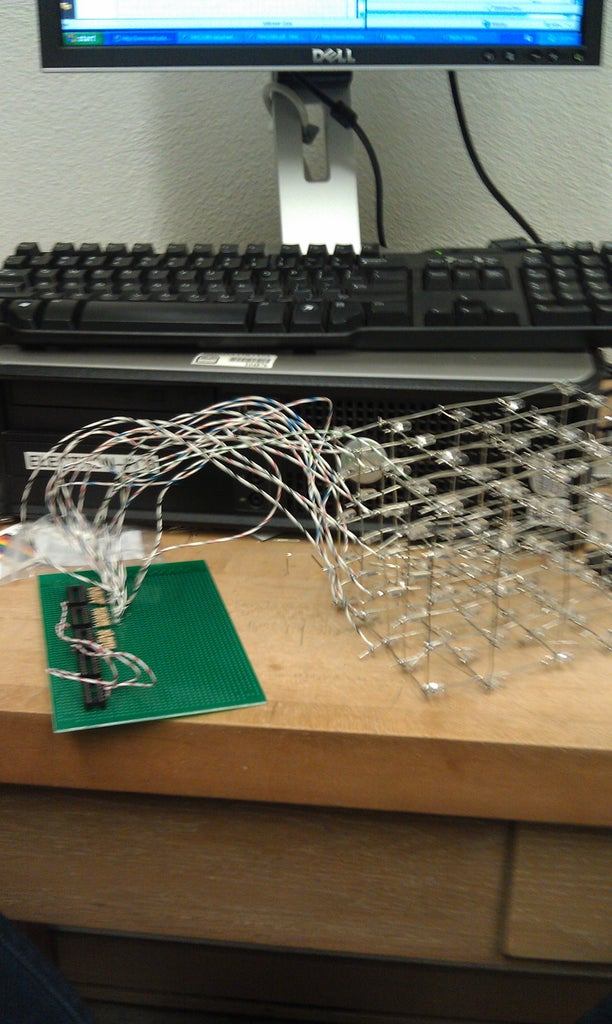
This is a step by step explanation of how to build a 5x5 LED cube using an arduino.  I did this project for my undergraduate electronics class and it took me about 2 weeks to complete.

Note: Apparently, some of the links for the supplies and code aren't working, if you need them send me an email at amh02010@mymail.pomona.edu.

You can find a video of the working LED cube on youtube here:
http://www.youtube.com/watch?v=KiE-WHqU5a8&feature=youtu.be


And here's another:
http://www.youtube.com/watch?v=6zRlhSzXP80&feature=youtu.be


Step 1: Supplies

I used www.mouser.com and www.amazon.com to order my materials for this project. The main parts needed are:
-125 LEDs
-30x 150 Ohm resistors
-5x 3-8 Line Decoders
-5 NPN Transistors

The manufacturer numbers and prices can be found in the attached document though the cost was about $40.

Additional required materials:
-Arduino uno
-Soldering iron
-Solder
-Sturdy wire (for structure of cube)
-Insulated wires
-Breadboard
-sockets (for decoders)

Step 2: Cube Construction

IMAG0160.jpg
IMAG0162.jpg
IMAG0164.jpg
IMAG0163.jpg
IMAG0165.jpg
Unfortunately, I have not perfected the construction of the cube.  I found this portion of the project both frustrating and painful (hot wires!). 

I began by assembling the 5 layers or planes of the cube.  This involved connecting all the cathodes of the LEDs together.  Id did this by poking 25 LEDs (about 1 inch apart) into a piece of styrofoam.  I bent all the anodes out of the way and soldered the LEDs in 5 columns and then two rows on the end (see picture). Be careful when soldering because the entire wire becomes hot and I accidently burned myself multiple times by touching the end of one of the wires.

The next step in cube construction is even trickier.  You need to connect the anodes of the LEDs in 25 vertical columns without letting any of them (or their connecting wire) touch the cathode planes.  The way I did this was leaving the top plane in the styrofoam and placing ~6 inch wires next to the anodes. I used needlenose pliers to curl the anodes into loops so that it was easier to solder. Alternate the directionality of the wires of the cathode planes for stability. See photos.

Step 3: Wiring and Breadboard

IMAG0175.jpg
IMAG0178.jpg
See attached pdf for a circuit diagram. 3-8 decoders labeled A-E. But a brief overview...
1) Solder sockets into  board (w/o decoders in)

2) Wire in series with socket pins according to 3-8 decoders as follows (see http://www.alldatasheet.com/datasheet-pdf/pdf/15570/PHILIPS/74HC238N.html? for data sheet for further information)

Note: Error in circuit diagram. Z0 should actually be connected to the VCC wire.

"A"-"C" 3-8 decoders
-connect A0 together and to digital output 4 on arduino
-connect A1 together and to digital output 3 on arduino
-connect A2 together and to digital output 2 on arduino
-connect g to ground on arduino
-connect Vcc to 5V on arduino
-connect Y0-Y7 of "A" to COL1-COL8 (with 150 ohm resistor between)
-connect Y0-Y7 of "B" to COL9-COL16 (with 150 ohm resistor between)
-connect Y0-Y7 of "C" to COL17-COL24 (with 150 ohm resistor between)

"D" 3-8 decoder
-connect A0 to other AO and to digital output 4 on arduino
-connect A1 to other A1 and to digital output 3 on arduino
-connect A2 to other A2 and to digital output 2 on arduino
-connect g to ground on arduino
-connect Vcc to 5V on arduino
-connect Y0 to COL25 (with 150 ohm resistor between)

"E" 3-8 decoder
-connect A0 to digital output 6 on arduino
-connect A1 to digital output 5 on arduino
-connect A2 to ground on arduino
-connect g to ground on arduino
-connect Vcc to 5V on arduino
-connect Y0 to E3 of "A" decoder
-connect Y1 to E3 of "B" decoder
-connect Y2 to E3 of "C" decoder
-connect Y3 to E3 of "D" decoder
-connect pEN (E3) to digital output 12 on arduino

3) Solder 5 150 ohm resistors into board. Then solder base of 5  transistors in series with resistor. Ground the collectors. Solder wire leads to emitters of transistors to Z0-Z5 (planes of cube).

Step 4: Programming

CLARIFICATION:
The column numbering can be seen in the attached pdf. The first column is the back left corner, then the numbering increases left to right for each row.

With respect to the programming, the data sheet I attached on the previous step will be helpful (ESPECIALLY THE LOGIC TABLE). You code the arduinio to ouput a 5-digit binary number to the decoders and then to the 25 columns (via digital ouptuts 2-6, where setting a pin to high is a one and setting a pin to low is a 0). Then you also code the arduino to set a specific plane of the cube to high to determine which plane of a specific column you want to light up.  To light up multiple LEDs from the same decoder you have to flash between the "columns" at a delay rate less than the human eye can detect.  Please see my attached code to find out how to light up individual LEDs, columns, planes, spell letters, and create patterns. 

Attached is a sketch showing the labeling of LEDs, columns, and planes.
Note: My method of coding is very long because I don't remember much from my intro to computer science course. Could shorten code by using if statements, loops, etc.

EX.
To illuminate LED28 (in COL3, plane 2)
You want all the levels low, besides the second one so,
  digitalWrite(Z0, LOW);
  digitalWrite(Z1, HIGH);
  digitalWrite(Z2, LOW);
  digitalWrite(Z3, LOW);
  digitalWrite(Z4, LOW);
And then to call the correct column, look at the logic table in the datasheet., Begin by setting p3 and p4 to determine which decoder connected to the cube to direct to. Because we want COL3, we want the first decoder "A" which means setting
A0, A1, A2 to LOW (So Y0 goes high and enables the first decoder).  A2 is always low on the initial decoder "E" so set its other address inputs to low as well such that...
  digitalWrite(p3, LOW);
  digitalWrite(p4, LOW);
Then need to determine which output of decoder "A" you want. Since it's the third column you want the third output.  When A0, A1, A2 are LHL, Y2 goes high so,
  digitalWrite(p0, LOW);
  digitalWrite(p1, HIGH);
  digitalWrite(p2, LOW);

1-40 of 98Next »
cmaia2 says: Jun 5, 2013. 11:34 PM
Hello, my name Cleiton, I'm Brazilian, and I would love to do this project.
Until now, reading your post, I understood a lot, but since I do not know (and dislike), programming, or would like postasse send me by email the code ready, the one you posted is "forbidden", I can not access it.
Thanks in advance: D
cmaia2 in reply to cmaia2Jun 5, 2013. 11:36 PM
I really need the code. > <
Can send me by email: cleiton_maia@hotmail.com
thank you
Amun_Ra says: May 11, 2013. 2:25 AM
Hi there, I followed your guide as best as I can but am not quite sure how to interpret the connection from the planes (Z0-Z4) in your circuit diagram. Should each plane (Z) be connected BOTH to the arduino via a resistor AND to VCC (the diagram says gound but I read that was an error)? Wouldn't that short-circuit all planes?
icky_unicorn (author) in reply to Amun_RaMay 13, 2013. 3:49 PM
Hi! From the arduino ouputs, the wires for the planes should be connected to a transistor where the emitter connects to the planes and the collector is connected to the VCC. Let me know if that works.
icky_unicorn (author) in reply to icky_unicornMay 13, 2013. 4:00 PM
Though, I'm still pretty sure I connected my collectors to ground.. the connection to the VCC was a correction by someone who made my project, so I'm not totally certain.
SHIFT! says: Jun 30, 2012. 3:39 PM
Hey icky_unicorn, just wanted to say thanks for your truly awesome instructable! Your LED Cube was the first project I ever made with arduino and it came out fantastic! Thank you for sharing!

BTW, slight correction on your circuit diagram. Z0 should actually be connected to the VCC wire. But other than that awesome!
icky_unicorn (author) in reply to SHIFT!May 13, 2013. 3:58 PM
Hi! You made this correction a while ago, and I am getting a lot of questions about how the planes should be connected to transistors Ground/VCC. I made this cube a while ago and can't totally remember the set up, but I'm pretty sure I connected I connected the arduino outputs to the transistor with the emitter connected to the planes, and the collector connected to ground. You thought the collector should be connected to VCC?
cyclone731 in reply to SHIFT!Aug 16, 2012. 3:48 PM
Could you explain what you meant here with connecting Z0 to VCC. I think i might be missing something but if you connect Z0 to vcc you will no longer have a lead going to that ground plane and nothing lights up on that one. I tried several other configurations with vcc on the collector instead of ground but that realy didn't make much sense to me when i thought about it. Im having issues with not all of the pattern showing up, but as far as i can tell it is displaying the pattern correctly. i'm suspecting it might be the transistors
shanerm in reply to SHIFT!Aug 7, 2012. 5:48 AM
It chould be connected to the VCC wire instead of analog outbut 7? Or both? Sorry, I'm just learning all of this Arduino stuff, it's so cool though!

Thanks,
Shane
shanerm in reply to shanermAug 7, 2012. 8:09 PM
*Could it

icky_unicorn (author) in reply to SHIFT!Jun 30, 2012. 4:08 PM
Thanks! I'll make a note of that error. :)
rsaceanu says: May 7, 2013. 8:52 AM
what value have the transistors?
icky_unicorn (author) in reply to rsaceanuMay 7, 2013. 10:47 AM
I used the following transistors:

Mouser #: 863-2N4401G
Mfr. #: 2N4401G
Manufacturer: ON Semiconductor
Desc.: Transistors Bipolar (BJT) 600mA 60V NPN
RoHS: RoHS Compliant
Edmoon says: May 6, 2013. 8:49 AM
Hello I have a problem with the link that has .docx at the end so could you please send me the code?
Email: mondchung@gmail.com
Ravboy82 says: Apr 21, 2013. 8:10 PM
Can any one please tell me where the pin 12 from the arduino go to!!!!!
mng8 says: Apr 11, 2013. 3:16 AM
The project is awesome, i would like to do one myself too, could you please send me the code? my email is melvinngjl@gmail.com .
KRITIKA15 says: Apr 10, 2013. 10:09 AM
the project is awsome . but plez send me the code at my id. Its kritika.porwal@yahoo.com
betonano says: Apr 10, 2013. 8:12 AM
Thanks, it's an excellent project
betonano says: Apr 9, 2013. 11:30 AM
Hi, I have problems with programming, you could send an email with your code please
icky_unicorn (author) in reply to betonanoApr 9, 2013. 12:07 PM
Sure, just message me your email and I will attach the new document
betonano says: Apr 9, 2013. 11:32 AM
Hi I have problems with programming, you could send an email with your code please
humberto_nano4@hotmail.com
Ravboy82 says: Apr 3, 2013. 3:26 PM
Hello
I really like how you made this project.This is going to be my first big electronic project.
Could you please send me the parts list needed and the codes please!
sulemankhan1996@hotmail.com
Thank you!
chamaran8 says: Mar 31, 2013. 8:38 AM
Can you please send me the code?>_< thank you for being done it for me.... chamaran8@gmail.com
emmabellep says: Mar 27, 2013. 9:10 AM
Can you please send me the code? patmore1eb@alma.edu
zap56 says: Mar 25, 2013. 5:38 AM
Hey. can you send me the code too please? zap56@luukku.com
jonniebgood says: Mar 17, 2013. 8:53 AM
Mar 17, 2013. 8:50 AMReply
Hi, I have got so far with your 5x5x5 cube and now need the coding please. Will it be possible to e-mail me the coding details .
Kind Regards
John
icky_unicorn (author) in reply to jonniebgoodMar 17, 2013. 11:21 AM
Sure. Message me your email.
cmcnabb2 says: Mar 9, 2013. 8:33 AM
i need help with y7 output on first 3 decoders its not working right i have checked all conections and noticed it not putting ou the correct voltage directly from that pin
icky_unicorn (author) in reply to cmcnabb2Mar 10, 2013. 2:16 PM
what do you have it connected to? have you checked that the decoder works otherwise?
neo3587 says: Mar 9, 2013. 8:18 AM
digitalWrite(); is a really bad instruction, better use:

void setup () {
DDRD = 0xFF;
DDRB = 0x3F;
DDRC = 0x3F;
}
void loop () {

PORTD = 0b00000011;
}
/* PORTD = pins 0 to 7, now for example I'm activating pin 0 and pin 1 to HIGH.
PORTB = pins 8 to 13
PORTC = pins A0 to A5 (yes, analogic input pins)

those instructions are ~10 times faster, and spends less memory, also you can actívate multiple pins at the same time and not 1 by 1.
*/
Geekaton says: Mar 7, 2013. 10:43 AM
hi
i am 15 and have made my own LED cube, heres a video of how I made it: http://www.youtube.com/watch?v=gTZJOy70rrc&list=LL7RW6Py5QalcKDnSCnX9_Dw
let me know if its helpful!
juliusli says: Mar 6, 2013. 11:13 PM
because some led are dark,
also,how to switch on 125 leds at same time ?
the truth table only show each 1 output = =
icky_unicorn (author) in reply to juliusliMar 7, 2013. 9:25 AM
have I sent you my code? that shows how to light up every LED as well as multiple LEDs at a time. if I haven't sent it to you, send me your email
juliusli says: Mar 6, 2013. 10:03 AM
hi, i want to know how to brighten up all leds
icky_unicorn (author) in reply to juliusliMar 6, 2013. 10:12 AM
I think if you increased the voltage it would brighten the LEDs but you would have to be careful not to blow out the resistors.
MozeAngel says: Feb 28, 2013. 1:21 PM
It works only when is connected to pc?, can I somehow put programm in and use without PC?
icky_unicorn (author) in reply to MozeAngelFeb 28, 2013. 2:28 PM
Hey. I'm pretty sure that if you save the program to the arduino (while it's plugged into the computer) and then attach the arduino to an external power source, it should run.
santosjl says: Jan 30, 2013. 3:02 PM
can you send me the code too please? santosJL87@gmail.com
My 3month old son was hypnotized watching your video so i thought it would be fun, for him and me, if i can pull it off. thanks so much!
juliusli says: Jan 29, 2013. 12:29 AM
would u plz send me the code ?
starlai@live.hk
karthiksagar says: Jan 26, 2013. 8:51 PM
please mail the ckt to my mail id karthiksagar9999@gmail.com
1-40 of 98Next »
Pro

Get More Out of Instructables

Already have an Account?

close

PDF Downloads
As a Pro member, you will gain access to download any Instructable in the PDF format. You also have the ability to customize your PDF download.

Upgrade to Pro today!