Main.jpg
intro.jpg
 

I've always wondered how did electronic locks work, so once i finished the basic digital electronics course I decided to build one myself. And I´ll help you to build your own!


You could connect it to anything from 1v to 400v(or maybe more that depends on the RELAY), DC or AC, so you could use it to control another circuit, or even to electrify a fence!! (please dont try that, really dangerous)… I connected a mini chrismas tree to the output (110v) cause I hadnt taken the holydays decoration off my lab, so it was around at the time i finished the proyect.


Here are some pictures of the finished System, and a video too, so you can see it working.

 
Remove these adsRemove these ads by Signing Up

Step 1: How does it work?

diagrama.bmp
 
 
First I thought in what was needed to be processed and how. So i drew this diagram as a map to guide me as i build each part of the proyect. Heres a summary of how it works.
  • First we need a circuit to decode the 10 possible inputs (0-9) to its 4 output BCD (Binary Coded Decimal), and another output that tells us when any button is pressed.
  •  Then we need to build the circuit for our two 7-segments displays to work properly, with 4 inputs for a BCD number and of course 7 outs for our displays, ( I used the IC 74LS47)
  • Then a circuit to save each pressed number and toggle between displays
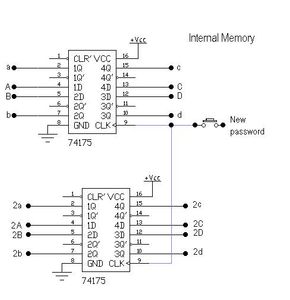
  • As well as an internal memory for our password
  • And, the hearth of our lock, the comparator (its 8 bits ´cause there are 4 bits per digit in the display, meaning that if you want to do a 4 digit lock you will need two of this connected together.) This will tell us if the numbers in the displays are the same as the password saved in the internal memories.
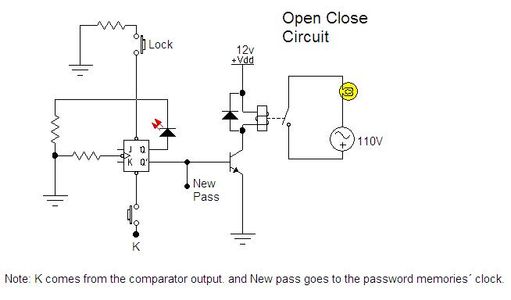
  • And finally a circuit to keep the OPEN or CLOSE signal for an undetermined time, and of course an output (thats whatever you want to control with your lock)
afz2004 says: Apr 15, 2013. 1:00 AM
nino, how to connect all this circuit? especially the display memories circuit. I don't understand it with the internal memories. does it came together in display memories circuit? thank you.
Nino123 (author) in reply to afz2004May 22, 2013. 3:27 PM
Hey, sorry again for the late reply, finals are killing me, but well thats what you have to go through to be an engineer! Well, about how to connect it... Most of the diagrams I posted, came from a software which not only numbered each pin, but also named it; in order to be able to understan that, you need to know your ICs, and by that I mean reading the datasheet, and understanding the basic operation of your IC, and how to use each pin. I strongly recommend, that you practice easier circuits with each IC, just to get used to the Pinout and the way they work, and then youll be able to make any bigger project using as many as you need, after all, if you learn the alphabet youll be able to write poems, books or just about anything after practicing, the same applies here.
The 74175 is just as any other TTL IC, you have to power it with 5v, ground, and in this case, youll have to give it a signal that will trigger the change of state on the outputs(which will remain on that state indeterminately), acording to your inputs (which youll control on the keypad) . In this case, the output are coded to BCD, and then translated from that to a 7segment display "language" by our 7447
afz2004 says: Apr 8, 2013. 4:19 AM
I'm sorry. actually I posted once only. Don't know how it repeated again. By the way, thank you very much for your explanation. I will seek your advice if I stuck at somewhere later. :D Thank you once again.
afz2004 in reply to afz2004Apr 8, 2013. 4:19 AM
this is my new account from azaki-1. thank you.
azaki-1 says: Apr 1, 2013. 11:14 AM
hi. I have same project with you where I have to build digital combination lock. I just want to confirm with you which is my project need to enter 4 numbers, and reconfirm again the number input. If correct, then it will light up GO LED. if not, NOT GO LED. So, it is my project almost same to you or not. Thank you in advance, and really need your explanation on your projects.
Nino123 (author) in reply to azaki-1Apr 4, 2013. 11:27 AM
I answered on the last comment reply, but It has been a lot of time since the last time I used Digital circuits, I can totally tell you that using a Pic, PICAXE, Arduino, Parallax, or any other microcontroller would make your whole proyect really easy. Its easier to learn how to program (and maybe cheaper) a microcontroller that learning digitals. But if you, (like in my case) MUST use Digital Circuits (TTL 74XXX) I hope my proyect serves as a guide, If you really need more help, you can send me a Personal Message, Ill try to answer as soon as I can, just be patient, Im an engineer student, I have not a lot of free time.
azaki-1 says: Apr 1, 2013. 11:14 AM
hi. I have same project with you where I have to build digital combination lock. I just want to confirm with you which is my project need to enter 4 numbers, and reconfirm again the number input. If correct, then it will light up GO LED. if not, NOT GO LED. So, it is my project almost same to you or not. Thank you in advance, and really need your explanation on your projects.
Nino123 (author) in reply to azaki-1Apr 4, 2013. 11:22 AM
Yes it really almost the same. On the output, the led that will go or will not go out is just the same as my Relay for 110v, instead of wiring the relay to the output, just connect the led directly where the Q or Q' depending on your case. If you want it to be a 4 number combination lock, youll have to add two more displays, decoder(7447), memory(74145) and comparation blocks (7486). To make it double confirmation, you can add another flipflop (7476) before the led, so youll need two "clocks" (correct number on the input) for your last jk flipflop to turn the Q' ON.
azaki-1 says: Apr 1, 2013. 11:13 AM
hi. I have same project with you where I have to build digital combination lock. I just want to confirm with you which is my project need to enter 4 numbers, and reconfirm again the number input. If correct, then it will light up GO LED. if not, NOT GO LED. So, it is my project almost same to you or not. Thank you in advance, and really need your explanation on your projects.
mark16 says: Sep 24, 2012. 6:33 AM
I also would like to ask if you can suggest a circuit with these functions:
Code Breaker
Three digit code (0-9)
Three LEDs for right number but wrong position (red)
Three LEDs for right number and wrong position (green)
One digit display for the number of tries
One increment button for each digit
One GUESS button
One STORE button for new code
Switch debouncing using 555 timers or one shot multivibrators
Master reset button

thank you very much i would really appreciate it if you would respond with this post...
djmudslide says: May 17, 2010. 10:25 PM
 hey amigo... he intentado tu circuito con un amigo, y tenemos multiples fallas! ...será posible q envies algo de info extra a mi correo? irv_c45@hotmail.com... sobre todo los mapas de conexiones, tengo dudas sobre los puentes q aparecen en el primer mapa, y si existe una sustitucion de los diodos, o cual funcion cumplen (leí como un OR)... gracias d ante mano!
Nino123 (author) in reply to djmudslideMay 18, 2010. 1:16 PM
listo amigo, revisa tu correo electronico, te he enviado una respuesta a tu comentario, si tienes mas dudas, no dudes en contactarme, suerte con el proyecto..

no he subido mas proyectos, por que actualmente estoy dedicandome a aprender mas sobre microcontroladores y PLC...

mark16 in reply to Nino123Sep 24, 2012. 6:25 AM
can i have a complete circuit connection of this project where all the circuits in the step by step process are connected? i already made a simulation of this circuit but it happened that there is nothing on the display i just wanna ask why is that so... thanks
awsomehighvoltage says: Feb 15, 2010. 12:44 PM
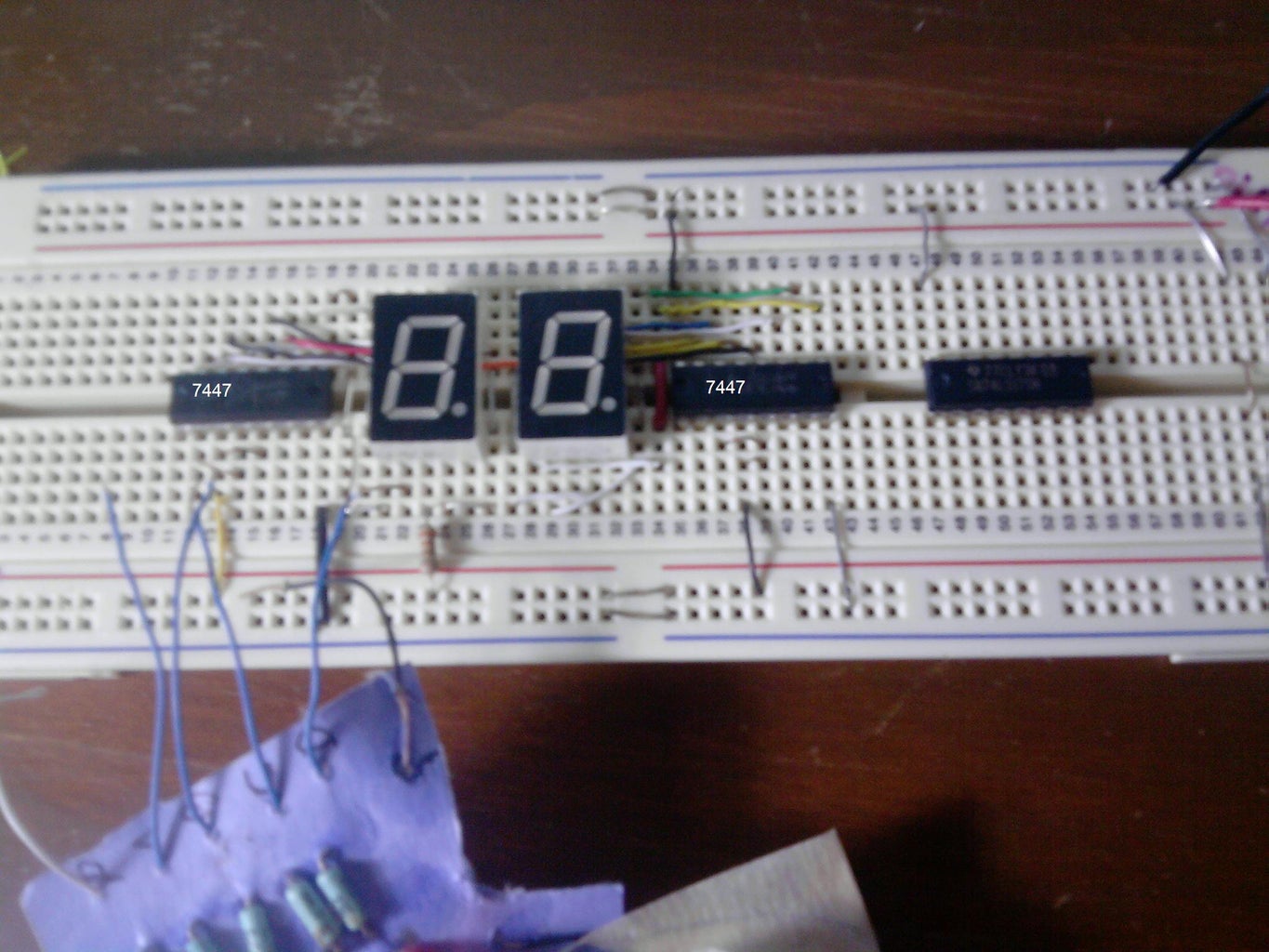
why is there a white led there in the middle?
Nino123 (author) in reply to awsomehighvoltageFeb 15, 2010. 3:01 PM
oh, that led!.. dont worry its not important at all...
I just connected it in the same spot as the first display clock, so i can always know wich is the next digit, (the first or second display), its just a visual aid to so i wont loose track of where the next number will appear, but it doesnt affect or improves the sistem
winzoque in reply to Nino123Sep 12, 2012. 5:28 AM
hello to the creator of this digital combination lock i think that this project was great...just want to ask something from your first step...i am having a problem with the switch "9" ,why is it the number "9" switch is not working in me, it keeps displaying number "8", so i want to ask if there is some problem with your schematic diagram from your first step, your fifth diode from the top. the one that is connected from the nineth switch connecting binary bit "A".
winzoque says: Sep 12, 2012. 5:27 AM
hello to the creator of this digital combination lock i think that this project was great...just want to ask something from your first step...i am having a problem with the switch "9" ,why is it the number "9" switch is not working in me, it keeps displaying number "8", so i want to ask if there is some problem with your schematic diagram from your first step, your fifth diode from the top. the one that is connected from the nineth switch connecting binary bit "A".
Gopesh gopu says: May 7, 2012. 1:06 PM
ma chudayo tum
nikitasamsukha says: Nov 1, 2011. 11:56 AM
nice
Uranio23 says: Apr 25, 2011. 7:08 PM
Hola que tal veo que este proyecto lo hiciste hace tiempo, tengo algunas dudas, me estoy "inspirando" en tu circuito para hacer un proyecto de electronica, no nos dejan usar micro ni nada de eso puras compuertas y cosas basicas.

Me preguntaba si podrias darme mas info sobre el circuito, mi problema esta a la hora de querer hacerlo de 4 numeros la clave, no se como cambiar de memoria cada que pulso un boton... Tu lo haces con el J-K pero como seria para 4 ?

Gracias y espero que puedas responder
EngineeringShock says: Feb 12, 2011. 1:30 PM
Nice
The LS7220 or LS7222 chips are designed so that you can do the majority of this, minus the displays. I remember when I did this project from scratch. I designed it very similarily.
=)
Nino123 (author) in reply to EngineeringShockFeb 14, 2011. 7:49 PM
yeah, i think that the best part of building something like this {designing everything from scratch} is the excitment of the adventure... having your first design problems, having to do research to solve them, {and probably go nuts for a few days till you get it}...
as i mentioned around the begining, i was trying to use the most basic logic posible, you know, it was when i just completed my first digital electronics course, and most of the IC you could normally order online werent avaliable around here, {thank to Steren, now we got lots of IC and cool stuff cheaper and faster than before}..

anyway, i built it so much time ago... and now i perfectly know how to use uControllers, {PICs}.. so, everything could be controlled from a single chip...
but it was a nice first project...

now i look back at this, and feel a little bit homesick, but proud to have learned so much since then, and willing to keep learning!

ps. thanks for the IC number :D
3nigmat1c says: Mar 31, 2010. 7:48 PM
It may or may not be interesting, but use of a CD74hc4511 chip will free up a lot of board space (it's a all in one 7-segment to bcd decoder with flip flop and latch).  That way you can support up to 7 displays with a chip per segment and a single 8-3 multiplexer.  That can easily go from 7 to 15 with an additional multiplexer and only need 4 lines for data (always), and 3 lines for addressing (1 extra per new multiplexer). 

Nice project, this was very similar to the Digital Systems final Project I had to do in college.
AndrewGarza says: Feb 25, 2010. 11:36 AM
 Impressive. I always wanted to make a clock out of low level logic like this. Just seems like a lot of work. It is amazing how much easier/cheaper using a micro controller for something like this.
amando96 in reply to AndrewGarzaMar 4, 2010. 1:50 PM
 indeed, arduino + keypad, + seven segment displays and some code...
thats actually my next project, for a weather station.
HarveyH44 says: Jan 24, 2010. 5:41 AM
Quite an impressive job, both the project and the write up.  The only project I ever attempted like that on a breadboard, was a digital clock, which kept terrible time.  It took months to wire up, and figure out what went wrong.  I've since switched to microcontrollers.  So much easier to debug code, and you can take it anywhere to work on.

Might also look into making PCB at home.  It's not very expensive, and pretty easy with a laser printer.  Although, got a hunch your project would still take sometime to layout, and drilling so many holes...

Really nice work, though don't imagine very many people will build this, maybe a class project.
Nino123 (author) in reply to HarveyH44Jan 24, 2010. 8:03 AM
thanks, and yeah, i used this as my final proyect in school, you see im currently a 11th grade student here in Acuña, Mexico(Cbtis 54! arriba chivos bravos!)...
so I still dont know how to use microcontrollers (will be seen on 12th), so I used everything i knew so far.
And yeah, microcontroller look really cool, so cant wait to try them!!
which one will be the best for a beginner like me?, PIC, AUDRINO, AVR?...
ElmoRoyD in reply to Nino123Feb 8, 2010. 4:42 PM
Saludos desde Monterrey, yo soy de Sabinas y estudie en el CBTIS 20 hace ya rato. Es bueno ver gente de la región entrando a estas cosas
Nino123 (author) in reply to ElmoRoyDFeb 15, 2010. 3:02 PM
claro que si amigo, yo tambien estaba arto de ver muy pocos trabajos echos por compañeros mexicanos, y pense "pues no keda otra mas que poner manos a la obra" y asi fue coomo empeze, ultimamente he estado algo ocupado por eso no he podido seguir pero pronto continuare con los proyectos...
thatoneguydavid in reply to Nino123Jan 25, 2010. 11:47 PM
i would suggest Cypress Semiconductor PSoC -3   (programmable system on chip)  with a little practice writing C you can implement really complex systems with very few external components.  they take an FPGA and various analog circuits and wrap them up with a microprocessor on one chip.
drhoff in reply to Nino123Jan 25, 2010. 12:15 PM
 I agree with Luminous. Arduino is really great for beginners. If you can make a project like this, then you will have no trouble with it at all. Great Instructible.
LuminousObject in reply to Nino123Jan 24, 2010. 3:17 PM
For a beginner, I would definitely suggest Arduino. You just plug it into the computer and go. No need for any fancy programmers or any of that. Just a USB port and a cable.
peblairman says: Jan 27, 2010. 5:44 PM
Great job! Not trying to flame it or anything, but it looks kinda like a bomb lol
Udon says: Jan 24, 2010. 11:46 PM

This is really good! It's a lot of info to put together.

I'm starting a Digital Electronics course in Feb. so I'd love to try build this.

Pro

Get More Out of Instructables

Already have an Account?

close

PDF Downloads
As a Pro member, you will gain access to download any Instructable in the PDF format. You also have the ability to customize your PDF download.

Upgrade to Pro today!