Introduction: How to Send an SMS "text" Message From Yahoo! to a Cell Phone.

This will show you how to send a short message from a computer via the Yahoo!™ website to a cell phone, including how to reply and accept replies which are received in chat format. This is free to send to cell phones in the United States.
Step 1: Www.yahoo.com

1. Go to www.Yahoo.com and click on the “Mail” button.
Step 2: Logging in or Creating a New Account

2. Log into your Yahoo email account. If you do not have a Yahoo account please skip to step 2-b.
a- For users who have not used their Yahoo account for some time, follow any prompts requested in order to begin sending SMS (for example, reactivating your account or selecting your country).
b- Click on ‘Create New Account’ button at the bottom of the log in screen. Follow Yahoo's instructions on how to create your new account. Continue to log in.
Step 3: Becoming Available

At the top left of the screen, in between your username and ‘Sign Out’ it will show your status as either ‘Available’, ‘Busy’, ‘Invisible’, or ‘Offline’. If your status is ‘Available’ then continue to the next step. If it is not, then click the down facing arrow next to your status and highlight the ‘Available” option from the drop down list.
Step 4: 'New'
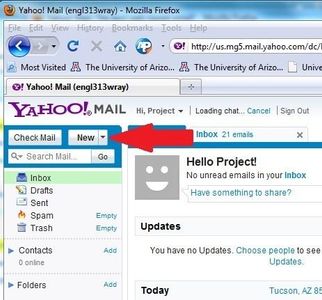
Find the button titled “New” near the top left corner of the screen. It is next to the “Check Mail” button. Click the downward facing arrow on the “New” button. Follow any prompts Yahoo presents.
Step 5: 'New SMS/'text''

From the drop down list select the last option tab that says ‘Text Message (SMS)’ (or similarly listed option for older Yahoo versions).
Step 6: Typing in the Cell Phone Number
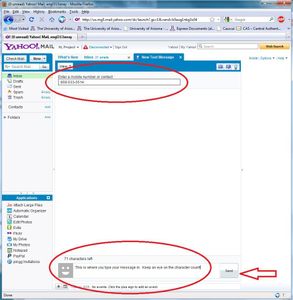
In the text bar under “Enter a mobile number or contact” type in the U.S. cell phone number, with area code, that you wish to send your SMS to. (At the top of the screen shot pictured ).
Step 7: Typing Your Message

On the bottom of the same screen there is another empty text box where you can type your SMS message. (At the bottom of the screen shot). The character count includes spaces and punctuations. It allows for up to 147 characters (actual character may vary based on how many characters your user name contains) and it will keep track for you.
Click the “Send” button on the right hand side of the text box. The next screen will show your sent message.
Step 8: Receiving/Replying to a Yahoo SMS


*If the cell phone receiving the SMS has another application similar to this feature (such as Google Voice) then they may not be able to receive the SMS.
a- The cell phone that you sent the SMS message to will receive a message from Yahoo telling them “A Yahoo! User is trying to send you a text message. When it arrives, select ‘Reply’ to continue the conversation”. This confirmation from Yahoo will only occur if it is the first time receiving a text message from Yahoo.
b- Accept your Yahoo SMS, if you sent it to your own cell phone. Follow the instructions from Yahoo. (Some phones will be able to automatically reply without selecting it). The recipient will view the message as being sent from your Yahoo user name (the ‘from’ number will be one from Yahoo’s servers and not related to anyone’s cell phone). Time to receive messages may vary based on phone service and type.
Step 9: Conversing
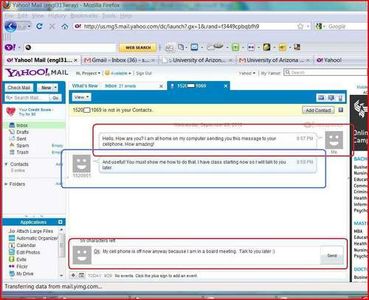
Your message, and the ones you receive from the person you sent the SMS to, will show up on screen as a chat window. This window may vary in appearance based on the version of Yahoo. You can continue to send the SMS for free (although the cell phone receiving it will treat it as a normal in-coming text message).