

Introduction: Arduino-basics





Arduino is generally used open source microcontroller u can-build your own Arduino u can do what ever . U can do anything in your imagination with this board (not extreme work like looking websites putting an is etc)
Step 1: Basic - Structure

*ABOUT BOARDS*
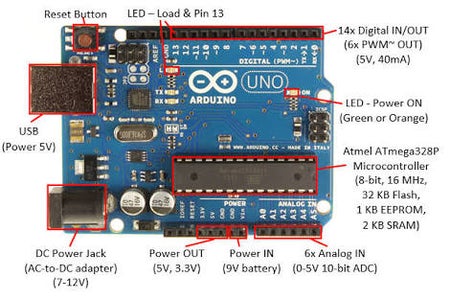
Arduino is a common name for a group of MC . There are multiple MC according to your use . If you are searching for a general go with Arduino UNO , if you want it compact version go with Arduino NANO ,If you want multiple number of pins and for multiple interfacing Arduino MEGA
*ARCHITECTURE*
I'm going to explain about Arduino UNO since it is a general MC board
# PROCESSOR #
Main part of any micro controller is a Micro Processor. If we are taking our brain as Microcontroller then Cerebral cortex will be the microprocessor . It takes in put processes according to our code and gives out put. 4004- is the first microprocessor and Arduino Uno has ATmega328P processor.
#GPIO#
GPIO- general purpose input output pins
Name explains everything. These are programmable pins according to your program they act as input or as output
Arduino Uno has 14 GPIO pins. Among GPIO pins 6 pins are PMW(Pulse Width Modulation)
#analog pins#
This is a feature we can see in modern MC boards. It contains analogue to digital converter .So you can give up to 5v analogue value input directly to your board. Arduino Uno has 6 analogue pins
#UART#
UART's are combination of Rx(receiver) Tx(transmitter) UART will control your serial communication with PC or with your serial communication device such as BLUETOOTH, WI-FI etc. While you up load the code u can se Rx blinking in your board .
Arduino Uno has 2 UART usually if u go for higher Arduino u will get more.
# CRYSTAL OSCILLATOR #
Crystal oscillator controls time inside a micro controller pulse width, delay , time period anything related to time will dippends on Crystal oscillator
while Arduino UNO has 16MHz.
#ICSP#
in-circuit serial programming (ICSP), is the ability of some programmable logic devices, microcontrollers, and other embedded devices to be programmed while installed in a complete system, rather than requiring the chip to be programmed prior to installing it into the system.
Note--
1. Arduino is easily available MC board used for hobby work or project
2. Arduino is self sustainable means if you dump the code then it an run the code on it's own so u need to dump the code only once
Arduino is a common name for a group of MC . There are multiple MC according to your use . If you are searching for a general go with Arduino UNO , if you want it compact version go with Arduino NANO ,If you want multiple number of pins and for multiple interfacing Arduino MEGA
*ARCHITECTURE*
I'm going to explain about Arduino UNO since it is a general MC board
# PROCESSOR #
Main part of any micro controller is a Micro Processor. If we are taking our brain as Microcontroller then Cerebral cortex will be the microprocessor . It takes in put processes according to our code and gives out put. 4004- is the first microprocessor and Arduino Uno has ATmega328P processor.
#GPIO#
GPIO- general purpose input output pins
Name explains everything. These are programmable pins according to your program they act as input or as output
Arduino Uno has 14 GPIO pins. Among GPIO pins 6 pins are PMW(Pulse Width Modulation)
#analog pins#
This is a feature we can see in modern MC boards. It contains analogue to digital converter .So you can give up to 5v analogue value input directly to your board. Arduino Uno has 6 analogue pins
#UART#
UART's are combination of Rx(receiver) Tx(transmitter) UART will control your serial communication with PC or with your serial communication device such as BLUETOOTH, WI-FI etc. While you up load the code u can se Rx blinking in your board .
Arduino Uno has 2 UART usually if u go for higher Arduino u will get more.
# CRYSTAL OSCILLATOR #
Crystal oscillator controls time inside a micro controller pulse width, delay , time period anything related to time will dippends on Crystal oscillator
while Arduino UNO has 16MHz.
#ICSP#
in-circuit serial programming (ICSP), is the ability of some programmable logic devices, microcontrollers, and other embedded devices to be programmed while installed in a complete system, rather than requiring the chip to be programmed prior to installing it into the system.
Note--
1. Arduino is easily available MC board used for hobby work or project
2. Arduino is self sustainable means if you dump the code then it an run the code on it's own so u need to dump the code only once
Step 2: Arduino-IDE

*Arduino-IDE *
Arduino language is java based language if you know java u can understand this easily. But don't worry it's just a simple language.
Main Elements
void setup-
here. u will type the commands which shud exicute only once
void loop-
Commands here will exicutes infinite times
pinMode-
pinMode(pin-number,mode);
This is used to define a pin is output or input . For analogue pins u have to give 'A' with the pin number
digital/analogueWrite-
digital/analogueWrite(pinNumber,HIGH/LOW);
This is used to make an output pin as high or low
digital/analogueRead-
variable = digital/analogueRead(pinNumber);
It will save the value received from the pin in veriable
These are the basic commands of ARDUINO it contains more library's and commands if u need anything more deep just GOOGLE-it !!
Arduino language is java based language if you know java u can understand this easily. But don't worry it's just a simple language.
Main Elements
void setup-
here. u will type the commands which shud exicute only once
void loop-
Commands here will exicutes infinite times
pinMode-
pinMode(pin-number,mode);
This is used to define a pin is output or input . For analogue pins u have to give 'A' with the pin number
digital/analogueWrite-
digital/analogueWrite(pinNumber,HIGH/LOW);
This is used to make an output pin as high or low
digital/analogueRead-
variable = digital/analogueRead(pinNumber);
It will save the value received from the pin in veriable
These are the basic commands of ARDUINO it contains more library's and commands if u need anything more deep just GOOGLE-it !!
Step 3: BLINKY
Arduino Blinky is the first and basic program . In this program we will be using pinMode and pinWrite function. You can see this program in your
ARDUINO IDE -> File -> Example -> Basics -> Blink
or copy the code given below
void setup()
{
pinMode(LED_BUILTIN, OUTPUT);
// initialize digital pin LED_BUILTIN as an output.
}
// the loop function runs over and over again forever
void loop()
{
digitalWrite(LED_BUILTIN, HIGH); // turn the LED on (HIGH is the voltage level)
delay(1000); // wait for a second
digitalWrite(LED_BUILTIN, LOW); // turn the LED off by making the voltage LOW
delay(1000); // wait for a second
}
NOTE:-
1. There is no need of external led since pin 13 is internally connected to L led (third LED except Rx,Tx)
2. U can use this program to check your ARDUINO also
ARDUINO IDE -> File -> Example -> Basics -> Blink
or copy the code given below
void setup()
{
pinMode(LED_BUILTIN, OUTPUT);
// initialize digital pin LED_BUILTIN as an output.
}
// the loop function runs over and over again forever
void loop()
{
digitalWrite(LED_BUILTIN, HIGH); // turn the LED on (HIGH is the voltage level)
delay(1000); // wait for a second
digitalWrite(LED_BUILTIN, LOW); // turn the LED off by making the voltage LOW
delay(1000); // wait for a second
}
NOTE:-
1. There is no need of external led since pin 13 is internally connected to L led (third LED except Rx,Tx)
2. U can use this program to check your ARDUINO also
