

Introduction: Make a Python Powered ChatBot #Raspberry Pi



Hello Guys,In this instructables i am going
show you how to make simple Python based chatbot. it's not powerful as Amazon alexa.
Must watch the video first (click here)
Step 1: Requirements

Hardware :
#Raspberry pi 3
(Note:-You can use Can raspberry pi version make sure you have connected wiffi Dongle to it)
Software:
#Python2
(No need to install python it is already install on raspberry pi)
Connect LED to GPIO 11.
Step 2: Working

NOW let me explain how this chatboat works here raspberry pi works as server& our app acts as client. Python server on Raspberry pi handles all the requests from the client. make sure RPi & android phone should be connected to same wiffi network.
You can also access your server outside Your Home wiffi network by Port forwarding.
Step 3: Android App

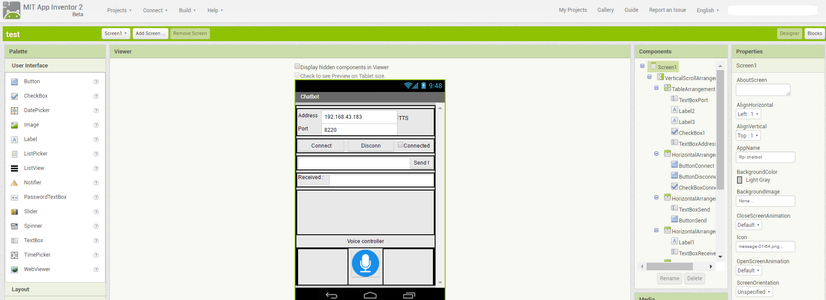
I have created this android app using MIT app inventor 2.
This app is basically a TCP client which make communication with server.
You can Download this app from below link(click here).
I have provided .aia file of MIT app inventor project you can import it & edit it according your needs.
Step 4: Python Server

open Python 2.7,Copy this code & paste it.
then Run this code.
You can modify it according to your needs.
import socket
import sys
import RPi.GPIO as GPIO
from thread import *
import datetime
import random
import requests
import os
GPIO.setwarnings(False)
GPIO.setmode(GPIO.BOARD)
GPIO.setup(11,GPIO.OUT)
host = ''
port = 8220
address = (host, port)
server_socket = socket.socket(socket.AF_INET, socket.SOCK_STREAM)
server_socket.bind(address)
server_socket.listen(5)
#Variable for the number of connections
numbOfConn = 0
#Name of list used for connections
addressList = []
clients = set()
##############################################################################
#small database of our bot
greetings = ['hola', 'hello', 'hi', 'hey']
questions = ['how are you', 'how are you doing']
responses = ['okay', 'i am fine']
database={
    'jarvis':'hello,sir how can i help you',
    'name':'jarvis',
    'what is your name':'my name is jarvis',
    'hello jarvis':'hello,sir how can i help you',
    'what can you do for me':'i can do many things..'
}
print ("Listening for client . . .")
###############################################################################
#chatbot code here
def chatboat(data):
if data in database:
print(database[data])
#os.system("flite -t '"+ database[data] +"'")
sclient(database[data])
elif data in questions:
random_response = random.choice(responses)
print(random_response)
#os.system("flite -t '"+ random_response +"'")
sclient(random_response)
elif data in greetings:
random_greeting = random.choice(greetings)
print(random_greeting)
sclient(random_greeting)
#os.system("flite -t '"+ random_greeting +"'")
elif 'light on'in data or 'led on' in data:
sclient("light turn on")
#os.system("flite -t 'light turn on'")
GPIO.output(11,True)
print("Light on")
elif 'light of' in data or 'led of' in data:
sclient("light turn off")
#os.system("flite -t 'light turn off'")
GPIO.output(11,False)
print("Light Off")
elif 'time' in data:
now = datetime.datetime.now()
time=str(now.hour)+str("hours")+str(now.minute)+str("minutes")
print(time)
#os.system("flite -t '"+ time+"'")
sclient(time)
elif 'date'in data:
now = datetime.datetime.now()
date=str("%s/%s/%s" % (now.month,now.day,now.year))
print(date)
#os.system("flite -t '"+date+"'")
sclient(date)
else:
conn.send("sorry please repeat..")
add_data = open("newdata.txt", 'a')
add_data.write("\n")
add_data.write(data)
add_data.close()
###############################################################################
#Sending Reply to all clients
def sclient(mess):
for c in clients:
try:
c.send(mess)
except:
c.close()
##############################################################################
#server code here
def clientthread(conn,addressList):
#infinite loop so that function do not terminate and thread do not end.
while True:
output = conn.recv(2048);
if output.strip() == "disconnect":
conn.close()
sys.exit("Received disconnect message. Shutting down.")
conn.send("connection loss")
elif output:
print ("Message received from client:")
data=str(output).lower()
print (data)
print("Reply from the server:")
chatboat(data)while True:
#Accepting incoming connections
conn, address = server_socket.accept()
print ("Connected to client at ", address)
clients.add(conn)
#Creating new thread. Calling clientthread function for this function and passing conn as argument.
start_new_thread(clientthread,(conn,addressList)) #start new thread takes 1st argument as a function name to be run, second is the tuple of arguments to the function.conn.close() sock.close()
Download this code from here
For more projects check out my YouTube Channel (Electronics Forever)

